Ancient — setup and launch
Preparation, activation and important details for Ancient.
A concise Ravzino guide. Follow only the procedure for your edition; if the supplied build differs, check its current materials before activating the key.
Steps to follow
- Check for an Intel/AMD CPU with AES, 16 GB RAM, Windows 10–11 (1809–24H2), and enabled SVM/VT-X. The individual product requirements also apply.
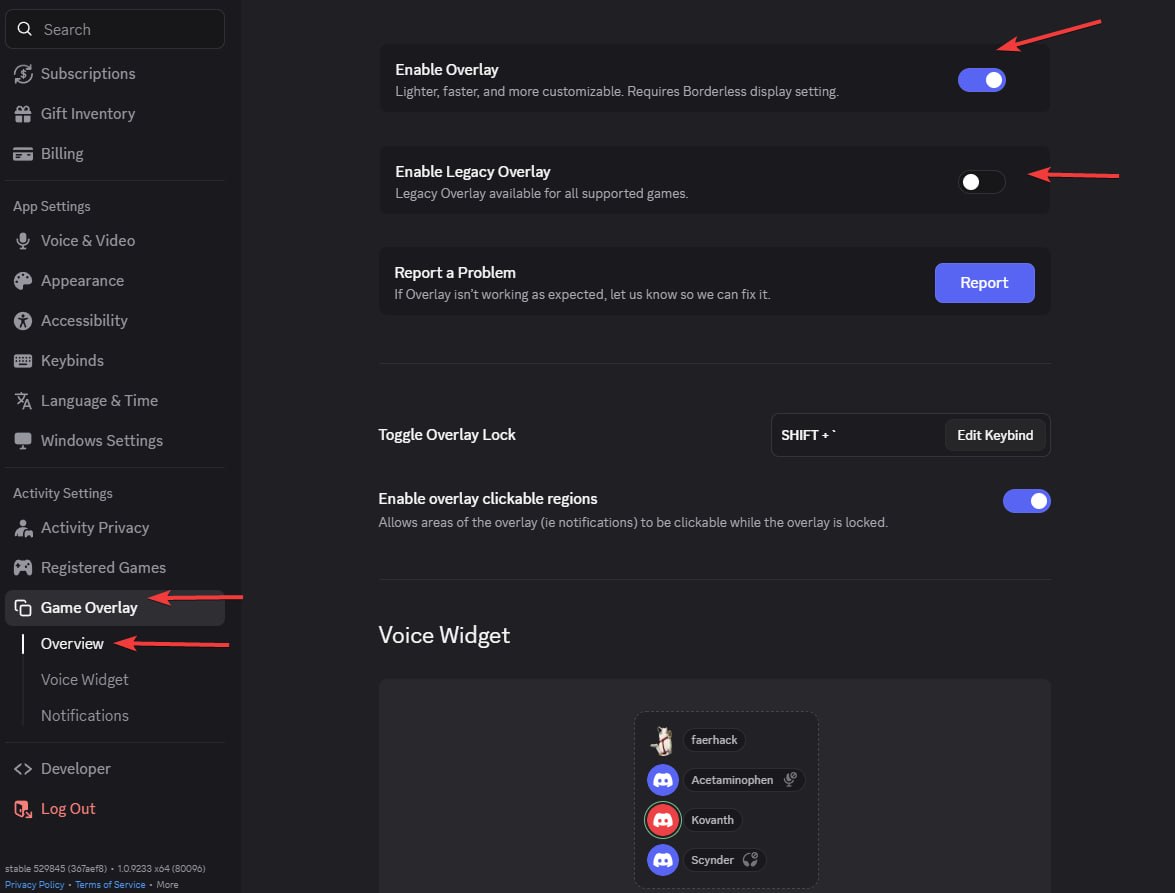
- For Apex Legends, ARC Raiders and Delta Force, prepare Medal or Discord and use windowed/borderless mode. In Discord, enable the game overlay, turn off Legacy Overlay and hardware acceleration, then restart Discord. Medal needs a signed-in account and an enabled overlay; the source states that access from Russia requires a VPN.
- For other games, NVIDIA users can use NVIDIA App or SteelSeries; AMD users need SteelSeries. Enable IN-GAME OVERLAY in NVIDIA App; it does not support fullscreen. In SteelSeries enable Sonar, bind Master — Volume Up under SONAR → Shortcuts, for example to F7, and press it before injection. SteelSeries supports fullscreen.
- Get the undetect.net loader, open it, paste your key and select Inject. Start the game after the loader closes automatically. Insert controls the menu; allow about one minute after injection for Apex/ARC/Delta.
- If there is no menu after 2–3 minutes, check the required overlay and repeat injection. For No suitable overlay, toggle the Discord overlay off and on. For SteelSeries flickering, disable ALLOW MOMENTS TO CAPTURE WHILE GAMING; check window mode with Medal/Discord.
- The separate Delta Force/Arena Breakout spoofing procedure in the source requires reinstalling Windows with a new user and deleted partitions, reinstalling the game, and using a suitable VPN IP from the first game-launcher login. This is a separate procedure involving data loss; normal launch does not replace it. Back up data and arrange preparation first.
- AES instruction set is not supported has no software fix. For virtualization, RST, RAID, UEFI or Incorrect HWID errors, record the exact message and seek help before changing disks or system files.
Files and additional materials
External manuals may use another language. Downloading a file does not establish its safety or compatibility.
Illustrations and videos