Recommended
BH Spoofer for HWID spoofers
BH Spoofer requires AHCI, Fast Boot and TPM checks. Static editions have separate persistence conditions; confirm the current Rust and EFT status.

Compatibility
- OS
- Windows 10 / 11 only
- SATA mode
- AHCI (in BIOS)
- tpm
- Disabled (TPM / fTPM / PTT / Security Chip)
- fast boot
- Enabled (in BIOS)
- Developer
- Rastaman, R4ndom
Features
How to check that the spoofer worked
- Sound notification: a short beep plays after injection. If you hear it, the step succeeded; otherwise, repeat the recommended setup and instructions.
- Console check: run WMIC DISKDRIVE GET SERIALNUMBER before starting, then repeat after launch. If the values differ, the spoofer is working; otherwise, check the setup instructions again.
Supported Games
- All games using BE/EAC anti-cheat. Other games are not officially supported, although the spoofer may work.
- Note: RUST and Escape from Krakow — anti-cheat updates are frequent, and the spoofer may temporarily stop working. Check with support or read the latest news before buying.
BIOS requirements
- AHCI mode must be enabled (already set on most PCs; switching from IDE to AHCI often requires reinstalling Windows).
- Fast Boot must be enabled.
Versions marked Static
- Identifiers are changed once and stay the same on subsequent injections. To reset them, delete the hwid file in the loader folder and restart the PC.
Usage instructions
- 1. Download and run the software, then change the Serial Number field for each drive. Restart the computer. Check that TPM is disabled.
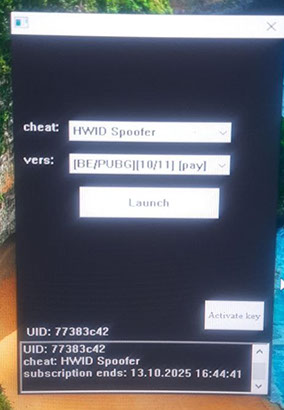
- 2. Start the loader and select HWID Spoofer.
- 3. Select the version marked [pay] and click LAUNCH.
- 4. Wait for the loader to close.
- 5. Start the game (if using a cheat, start the cheat first, then the game).
- To undo the spoofer's changes, restart the computer.
Gallery and videos
Open an image to explore the details