Buy private cheat Shack for ARC Raiders
Private cheat Shack for ARC Raiders — silent aiming, aiming controls and item filters. Also included: aim point selection and target selection radius. Client: Steam.
Compatibility
- operating system
- Windows 10 (1903, 1909, 2004, 20H2, 21H1, 21H2, 22H2); Currently not safe on Windows 10!; Windows 11 (21H2, 22H2, 23H2, 24H2); Best option is 24H2!
- cpus
- Intel / AMD
- game client
- Steam
- Built-in spoofer
- No;
- bypass obs entry
- Yes;
- supported game modes
- Windowed, Frameless;
Features
General
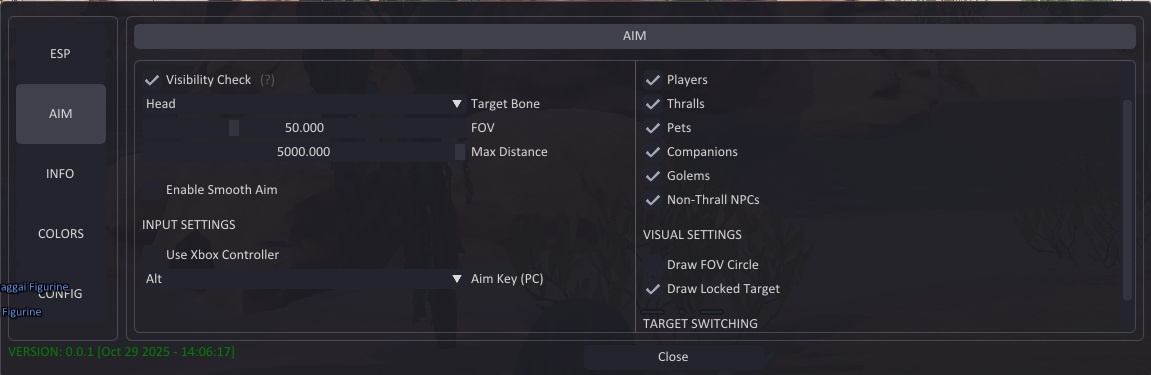
- Aimbot for ARC Raiders — Core settings
- Adjustable FOV (1–180°) — target acquisition field of view
- Maximum distance control (0–1000 m) — operating range limit
- Bone selection — precise aiming at the head, neck, chest and other body parts
- Visibility check — multiple target visibility detection modes
- FOV circle — visual indication of the target acquisition area
- Target highlight — visually marks the current target
- Flexible target selection and prioritization:
- Player aiming — automatically tracks opponents
- ARC aiming — targets enemy robots
- Aim smoothing (0–100%) — adjusts crosshair movement speed
- Target priority — prioritize players or targets with the lowest HP
- Target switching delay (0–1000 ms) — controls switching speed
- Automatic visible bone selection — selects an optimal aiming point
- Maximum target speed setting — filters fast-moving objects
Universal control system
- Xbox controller support — full gamepad operation
- Key settings — individual configurations for PC and Xbox
- Mouse, keyboard and controller support — multiple input methods
- Silent Aim FOV — Rage mode for aggressive play
ESP SYSTEMS FOR ARC RAIDERS
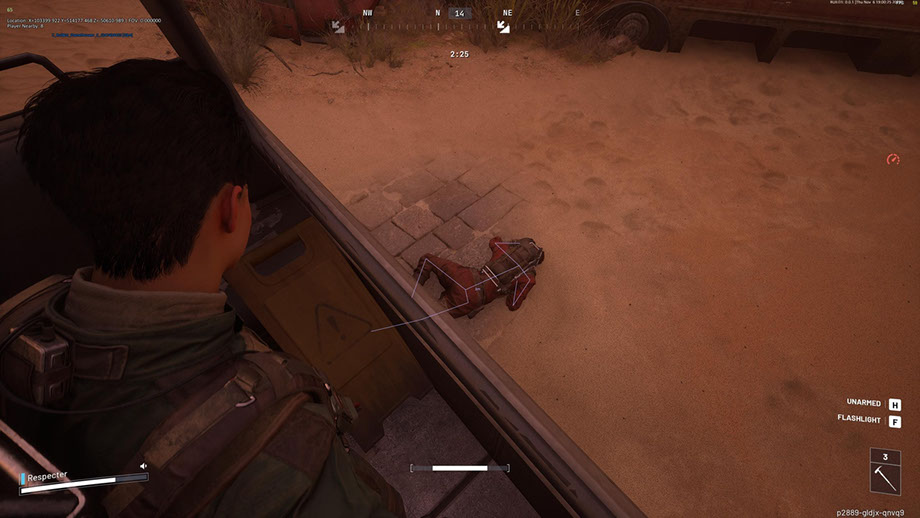
- Player ESP — opponent visualization
Core settings
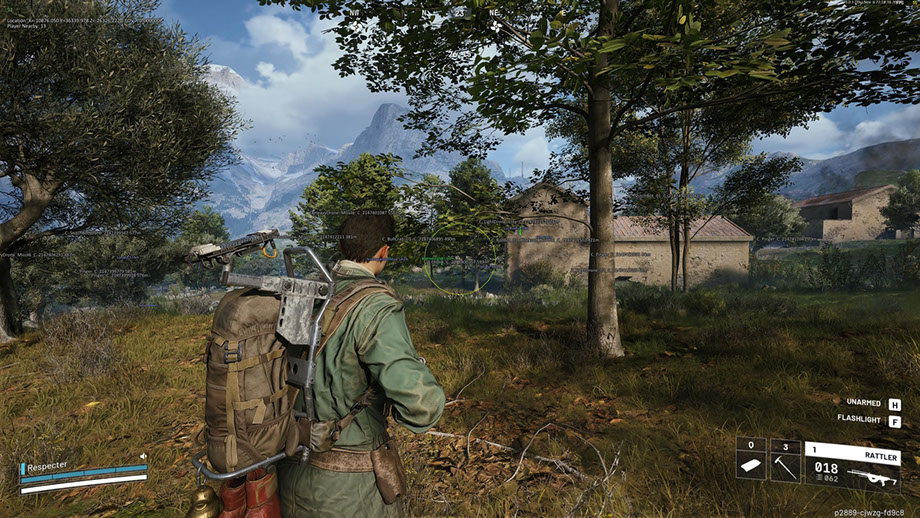
- Player names — shows nicknames above players' heads
- Distance display — distance to each player
- Boxes (2D / 3D) — visually highlights opponents
- Snaplines — lines pointing to targets
- Player skeletons — displays bone structure
- Visibility check — indicates visible/hidden targets
- Health bar — displays opponent HP
- Custom colors — separate colors for visible and hidden targets
- ARC names — robot identification
- Distance display — distance to each ARC
- Boxes (2D / 3D) — visual highlighting
- Snaplines — lines pointing to robots
- Skeleton — displays ARC structure
- Visibility check — visibility indication
- Health bar — displays robot HP
- Custom colors — colors for visible/hidden ARCs
Filters and settings
- Ally ESP toggle — show/hide allied players
- Show/hide bodies — controls corpse visibility
- Distance filter (0–1000 m) — limits display range
- Font size adjustment (8–30) — controls text readability
Config
- Distance filter (0–1000 m) — range limit
- Font size adjustment (8–30) — text settings
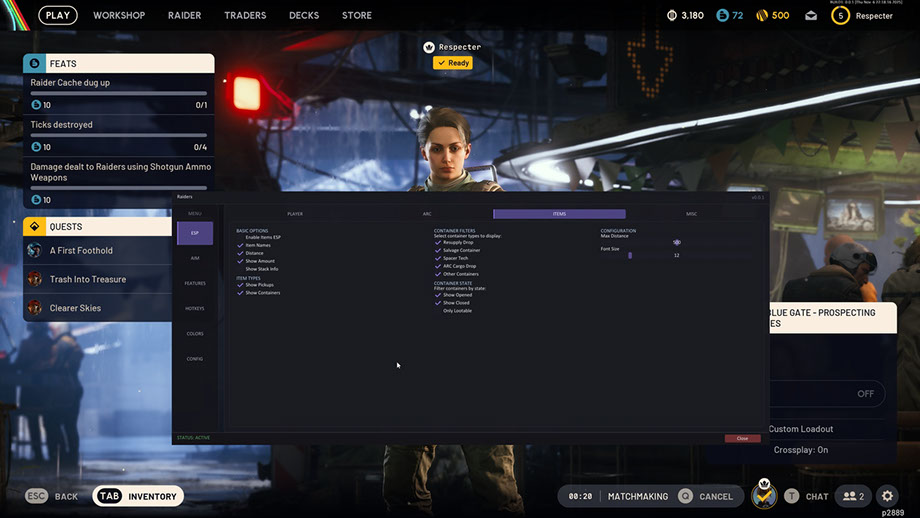
- Items & Containers ESP
Display settings
- Item names — names of all objects
- Item distance — distance to each item
- Counts and stacks — item quantity information
- Show picked-up objects — displays items already collected
- Container display — shows all containers
Container types
- Resupply Drop — supply containers
- Salvage Container — salvage containers
- Spacer Tech — technology containers
- ARC Cargo Drop — ARC cargo containers
- Other containers — remaining types
Filters and configuration
- Show open/closed containers — filter by state
- Lootable-only filter — shows only accessible containers
- Distance filter (0–1000 m) — range limit
- Font size adjustment (8–30) — text settings
- RADAR SYSTEM for ARC Raiders
- Smart mini radar for a tactical advantage in ARC Raiders:
Key Features
- Circular mini radar — compact view of the surroundings
- Player tracking — monitors opponents
- ARC tracking — monitors robots
- Item display — loot visualization
- Container display — shows containers on the radar
- Other objects — additional elements
Radar settings
- Size (50–200 px) — adjusts radar size
- Range (100–2000 m) — scanning radius
- Opacity (20–100%) — visibility level
- X/Y position — on-screen placement
- Icon size (1–8) — radar element scale
- Additional tools for comfortable play:
- Custom crosshair (1–30) — adjustable size
- FPS display — performance monitoring
- Player counter — opponents in the area
- VSync toggle — vertical synchronization control
- Multilingual font support — correct text rendering
- Font outline settings — improved readability
- Global font size (8–30) — shared text setting
- Show all objects (Debug) — developer debugging mode
Color system
- Individual colors for each element — full palette control
- RGBA color picker — precise color and opacity settings
- Separate colors for visible/hidden objects
- FOV color — target acquisition area color
- Crosshair color — crosshair customization
- Player color — player ESP settings
- ARC color — robot ESP settings
- Item and container colors — loot visualization
Convenient settings management
- Profile management — create and switch configurations
- Save and load configurations — quick access to settings
- JSON configurations — convenient storage format
- Xbox controller support — full gamepad integration
- Hotkey settings — custom key combinations
Modern, intuitive interface
- Modern design — current interface styling
- Dark theme — comfortable viewing during long sessions
- Tabbed layout — organized navigation
- Smooth animations — visual effects
- Tooltips — help with settings
- Resizable window — adapts to your screen
- Responsive design — displays correctly at different resolutions
SHACK PRIVATE FEATURES
- 1. Developer-described stealth features — in-game anti-cheat and OBS bypass
- 2. Developer-described stability; freedom from bans or failures is not guaranteed
- 3. Flexible configuration — full control over settings
- 4. Versatility — supports different input devices
- 5. Advanced algorithms and optimization
- 6. Ease of use — intuitive interface for beginners and experienced users