Recommended
Buy private cheat Stealth for Apex Legends
Private cheat Stealth for Apex Legends — body display, aiming controls and spread controls. Also included: target selection radius and item filters. Client: Steam, EA App.
Compatibility
- supported operating systems
- windows 10, 11 (x64) versions 21h1, 22h2, 23h2, 24h2, 25h2; Windows 11 26H2
- Supported processors
- only intel or AMD;
- supported game clients
- Steam, EA App
- supported bios
- uefi only;
Features
General
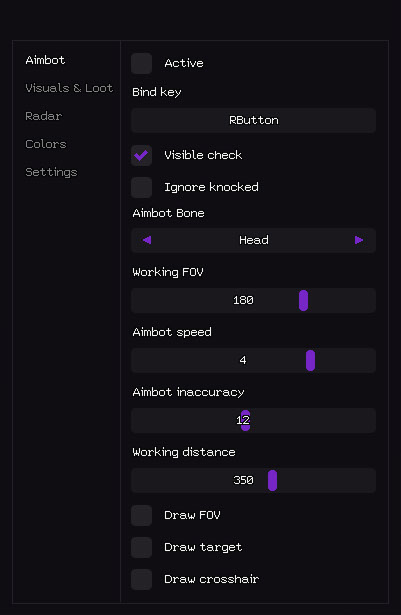
- Aimbot is the main function of automatic aiming:
Aimbot
- Active — enable/disable aimbot
- Bind key — aim activation key (e.g. RButton), with hold or toggle operation
- Visible check — aim only at visible enemies, without shooting through walls
- Ignore knocked — skip downed players
- Aimbot bone — priority bone: head / chest / pelvis
- Working FOV — target selection field of view
- Aimbot speed — aiming speed (1–10); lower values produce smoother, subtler aiming
- Aimbot inaccuracy — artificial spread for more natural-looking aiming
- Working distance — maximum aim range (0–600 meters)
- Draw FOV — show the operating area circle
- Draw target — highlight the current locked target
- Draw crosshair — display a custom static crosshair
- Visuals & Loot
Players
- Box – 2D box around players // Classic box around players
- Name – Show player nickname // Display nickname
- Health – Health value or health bar // HP in numbers or stripes
- Weapon – Current weapon name // What weapon is in your hands
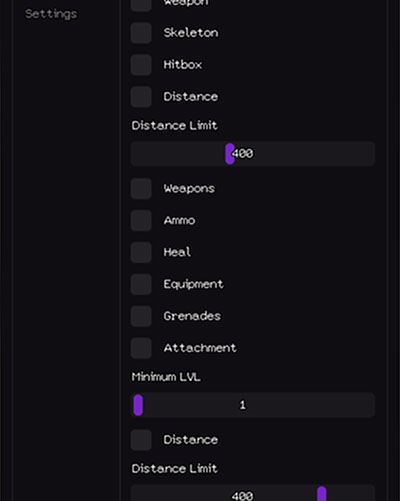
- Skeleton – Draw full player skeleton // Full skeleton
- Hitbox – Show hitbox positions // Display hitboxes
- Distance – Distance to player // Distance to player
- Distance Limit – Max render distance (0–1000 m) // Maximum rendering distance of ESP players
Loot
- Weapons – Highlight dropped weapons // Highlighting weapons on the ground
- Ammo – Show ammunition // Ammo
- Heal – Highlight meds / heals // Medicines and healing
- Equipment – Armor and clothing // Armor, helmets, clothing
- Grenades – Explosive items // Grenades, arcs, etc.
- Attachment – Weapon attachments // Body kits and modules
- Minimum LVL – Minimum rarity filter // Filter by minimum rarity level
- Distance – Show distance to item // Distance to item
- Distance Limit – Loot ESP radius (0–1000 m) // Maximum loot range
Corpses
- Corpse – Highlight dead player bodies // Highlighting corpses
- Distance – Distance to corpse // Distance to body
- Distance Limit – Corpse ESP radius (0–1000 m) // Corpse drawing range
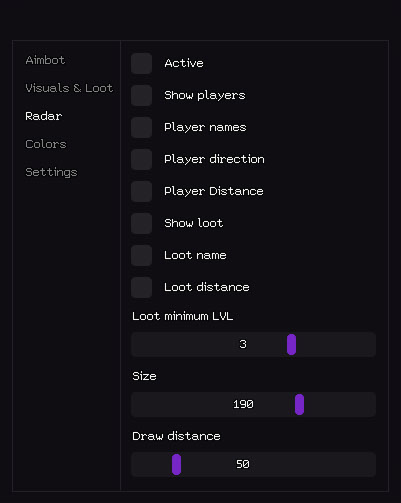
- Radar - mini-map with information about players and loot:
Radar
- Active — enable radar
- Show players — display players on the radar
- Player names — display nicknames on the radar
- Player direction — display view direction arrows
- Player distance — distance to each player
- Show loot — display loot on the radar
- Loot name — display item names
- Loot distance — distance to loot
- Loot minimum LVL — minimum loot rarity filter
- Size — radar window size (50–200 px)
- Draw distance — radar operating radius (50–400 m)
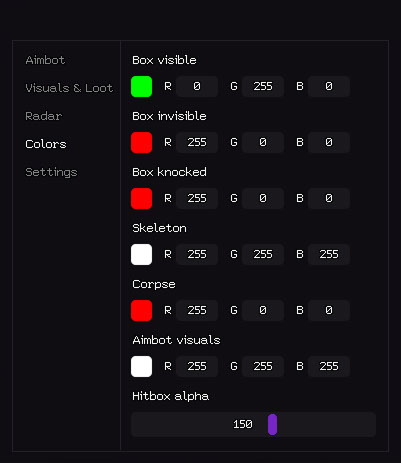
Colors
- Box visible – Color for visible players (RGB) // Color of the frame of visible players
- Box invisible – Color for occluded (behind wall) players // Color behind the wall
- Box knocked – Color for knocked players // Color of the fallen
- Skeleton – Skeleton color // Skeleton color
- Corpse – Corpse highlight color // Corpse color
- Aimbot visuals – Color of FOV / crosshair / target marker // Colors of aimbot elements
- Hitbox alpha – Hitbox transparency (0–255) // Hitbox transparency
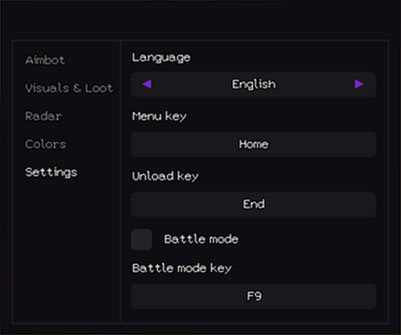
Settings
- Language – Interface: English / Russian // Menu language
- Menu key – Hotkey to open/close menu // Key to open the menu
- Unload key – Hotkey to completely unload cheat // Key to completely unload the cheat
- Battle mode – Separate aggressive config mode // Separate combat mode (can be quickly switched)
- Battle mode key – Hotkey to toggle battle mode // Key to enable battle mode